Flop Football is the original ragdoll soccer game made for this site: a two-player physics football game you play in your browser. Each player has one button. Press it and your floppy footballer leaps forward, swings both legs and, with a bit of luck, smacks the ball toward the other goal. First to 5 goals wins the Flop Football match. Looking for the classic version? Play Ragdoll Soccer on the homepage.
What is Flop Football?
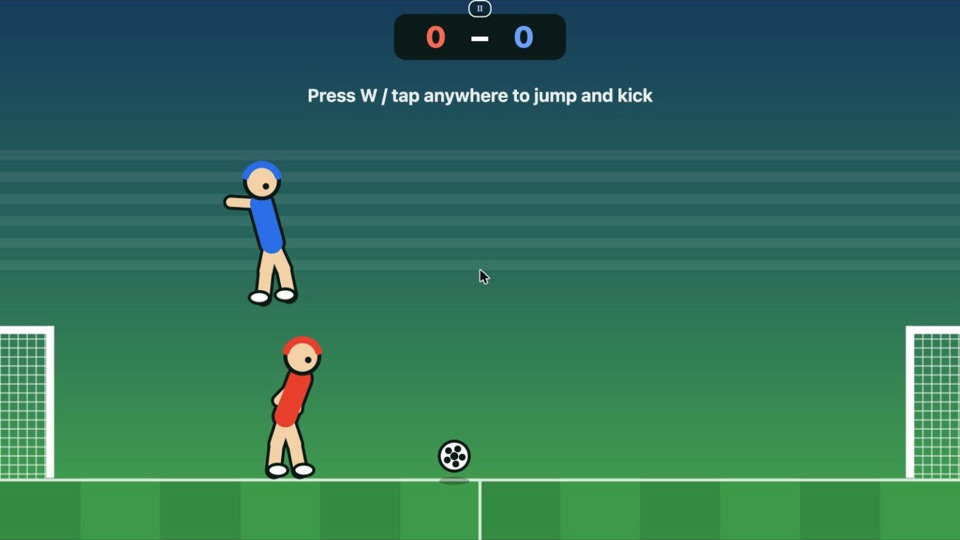
Flop Football turns football into a game of timing. Your player is a ragdoll: a body held together by loose joints, so arms flail, knees buckle and heads bump into each other. You never steer directly. You only decide when to jump, and the physics decides what happens next. That is why a Flop Football match swings between clean volleys, accidental own goals and two players tangled on the grass while the ball rolls past.
The pitch is a single screen with a goal at each end and a crossbar over each goal. Red attacks the right goal, Blue attacks the left goal. A goal counts when the ball goes under the crossbar and into the net.
How to play Flop Football
- Press Play Flop Football above, then pick 1 Player or 2 Players.
- Press your button to jump. Your player always jumps toward the goal you attack and kicks both feet forward in the air.
- Hit the ball with your feet, legs, body or head. Faster contact sends the ball further.
- Score 5 goals before your opponent does.
Flop Football controls
| Player | Keyboard | Touch screen |
|---|---|---|
| Red | W (or Space) | Tap the left half of the game |
| Blue (2 Players) | Up arrow | Tap the right half of the game |
| Pause | P or Esc | Pause button at the top |
In 1-player Flop Football you control Red with W, Space, the Up arrow or a tap anywhere, and the computer plays Blue.
Flop Football game modes
- 1 Player vs CPU. The CPU jumps when the ball comes near, chases it when it is ahead and drops back toward its own goal when the ball gets behind it. It is beatable, but it does not miss many easy chances.
- 2 Players on one device. Share a keyboard or a phone. This is the Flop Football mode most people come back to: one button each, no menus in the way, and a rematch takes one click.
Flop Football tips
These come from playing the game on this site, not from guesswork:
- Wait for the ball to drop. Jumping while the ball is high usually sends you under it. Jump as it falls to knee or chest height and your feet meet it on the way down.
- Don't spam the button. After each jump there is a short cooldown and you can only jump again once your feet are back on the ground. Pressing early does nothing.
- Use your head for high balls. If the ball is coming down right above you, a small jump puts your head in its path and knocks it forward.
- Mind the crossbar. A ball that hits the top of the crossbar bounces back into play. Low shots are safer than chips.
- Stay between the ball and your goal. Every jump moves you forward, so if you jump past the ball you leave your goal open. Against the CPU, let it overrun the ball and then counter.
- Bump your opponent. Bodies collide, so jumping into the other player just before they reach the ball can knock them off balance.
Flop Football features
- One button per player, so anyone can pick up Flop Football in a few seconds.
- Physics-based ragdolls: every jump, tumble and header plays out a little differently.
- 1-player mode against a CPU opponent and 2-player mode on the same device.
- Works with keyboard, mouse and touch, on desktop and on phones.
- Fullscreen mode, pause, and quick rematches.
- Free, runs in the browser, no download and no sign-up.
Playing Flop Football on a phone
Flop Football is built for touch. Tap anywhere on the pitch to jump in 1-player mode. In 2-player mode, hold the phone sideways between you: the player on the left taps the left half and the player on the right taps the right half. Press Fullscreen under the game for the biggest view.
Flop Football or Ragdoll Soccer?
Both are ragdoll football games. Ragdoll Soccer on the homepage is the well-known version many players already know. Flop Football is our own take: a single pitch, a CPU opponent that chases the ball, and a short first-to-5 match.
Why Flop Football is fun
Real football games ask you to learn passing, sprinting and shooting buttons. Flop Football asks for one decision, over and over: jump now or wait? Because the ragdoll physics never plays out the same way twice, even a lopsided score can turn around in a few seconds. A match takes a couple of minutes, so it fits in a break, and the 2-player mode turns one screen into a quick rivalry.
If you enjoy Flop Football, tell us your best result against the CPU in the comments, or challenge a friend to first to 5.
Ragdoll Soccer FAQ
Is Flop Football free?
Yes. Flop Football is free to play in your browser. There is nothing to buy and no account to create.
Can I play Flop Football on my phone?
Yes. Tap the screen to jump and kick. In 2-player mode the left half of the screen controls Red and the right half controls Blue. Turn your phone sideways and use the Fullscreen button for the biggest pitch.
Do I need to download anything?
No. Flop Football runs in the browser on this page. Press Play and the match loads right here.
How do two players play on one device?
Choose 2 Players. On a keyboard Red uses W and Blue uses the Up arrow. On a phone or tablet, each player taps their own half of the screen.
How many goals do you need to win?
The first player to score 5 goals wins the match. After every goal both players and the ball go back to the kick-off positions.
Can I pause a match?
Yes. Press P or Esc, or tap the pause button at the top of the game. The match also pauses when you switch to another tab.
Is my score saved?
No. Each match starts at 0 - 0 and the result is not stored. Leave a comment below if you want to share your score.
The game does not load. What can I do?
Reload the page and press Play again. If it still does not start, update your browser or try another one; the game needs a modern browser with JavaScript turned on.