Ragdoll Playground is a physics sandbox you play in your browser. There is no match, no level and no score: you pick a map, spawn ragdolls and objects, grab them, fling them and watch the physics take over. Ragdoll Playground is free and runs right here, with nothing to download.

What is Ragdoll Playground?
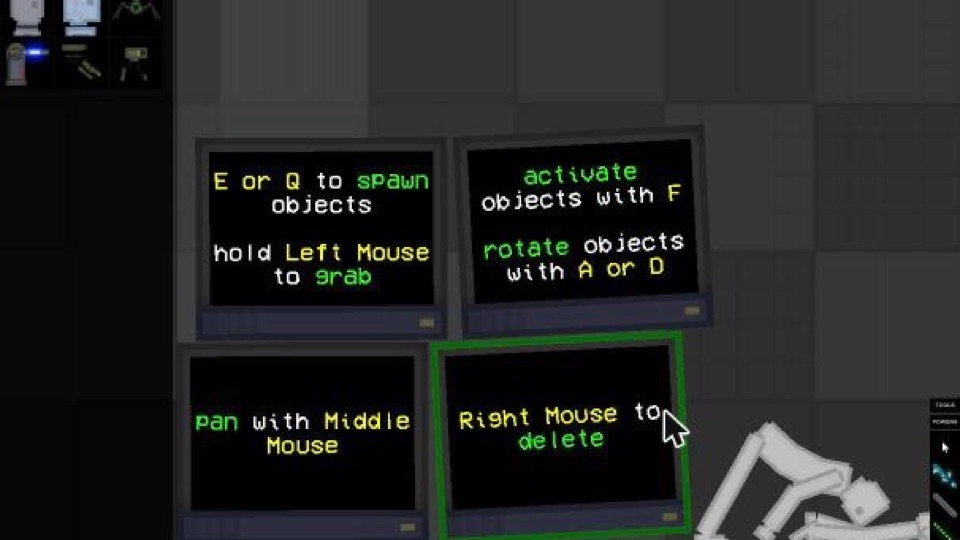
In Ragdoll Playground everything on the map is a physics object, ragdolls included. Ragdolls flop, stack, slide and tumble; the big tutorial screens on the default map can be knocked over too. You decide what happens next.
TwoPlayerGames.org, which makes the game, describes it as a place to build funny scenes, trigger explosions and test chain reactions with ragdolls, weapons, vehicles and tools. There are no missions to finish: the fun is in setting up a scene and seeing how it falls apart.
How to play Ragdoll Playground
- Press Play Ragdoll Playground above and wait for the game to load, then press its own Play button.
- In the game menu choose play, pick a map and press Enter.
- Choose something from the spawn menu in the top-left corner.
- Point at the map and press E or Q to spawn it.
- Hold the left mouse button to grab it and throw it around.
Ragdoll Playground controls
These are the controls Ragdoll Playground shows on screen when you enter a map:
| Action | Control |
|---|---|
| Spawn the selected object | E or Q |
| Grab and drag | Hold left mouse button |
| Activate an object | F |
| Rotate an object | A or D |
| Pan the view | Middle mouse button |
| Delete | Right mouse button |
Ragdoll Playground maps
The map menu lists 13 maps: Abyss, Blocks, Default, Humongous, Hybrid, Lava, Sea, Slanted, Small, Snow, Tiny, Tower and Void. Their preview pictures show what to expect: Lava has a sea of fire, Sea has water, Snow is covered in snow, Slanted has a sloping floor, Blocks starts with block towers, Hybrid is split into a fire side and a water side, and Humongous starts with a large vehicle. Default is an open room with the tutorial screens, the easiest place to begin.
Cleaning up and settings
Sandboxes get messy fast. The buttons in the bottom-left corner of Ragdoll Playground let you Clear everything, Clear debris or Clear living, and there are Settings and Environment buttons next to them. The top bar holds more tools for working with the scene.
Ragdoll Playground tips
- Start on Default. The on-screen controls are right there, and the room is big enough to experiment.
- Spawn, then grab. Spawning with E or Q is quick; holding the left mouse button lets you pick things up and throw them.
- Rotate with A and D. Turn an object while you hold it to line it up the way you want.
- Pan to make room. Hold the middle mouse button to move the camera when the scene gets crowded.
- Clear and try again. When a scene goes wrong, Clear debris or Clear everything gives you a fresh start without leaving the map.
Is Ragdoll Playground for everyone?
Ragdoll Playground is about smashing and flinging ragdolls, and its title screen shows a ragdoll being hit with a hammer with cartoon blood. If you are choosing a game for younger kids, take a look at it first, or try Ragdoll Soccer or Ragdoll Football instead.
More ragdoll games
Want a match instead of a sandbox? Play Ragdoll Soccer, where your player swings on a rope above the water or Ragdoll Football, a stickman match on a flat pitch. Or fight it out in Ragdoll Duel: Boxing, Funny Ragdoll Wrestlers and Ragdoll 2 Player, shoot in Archery Ragdoll, or browse all ragdoll games.
Ragdoll Playground FAQ
Is Ragdoll Playground free to play online?
Yes. Ragdoll Playground is free to play in your browser on this page, with no download and no account.
How do you spawn things in Ragdoll Playground?
Pick an item from the menu in the top-left corner, point at the map and press E or Q. Hold the left mouse button to grab what you spawned.
What are the Ragdoll Playground controls?
E or Q spawns objects, holding the left mouse button grabs them, F activates objects, A and D rotate them, the middle mouse button pans the view and the right mouse button deletes things. The game shows these on screen when you enter a map.
How many maps does Ragdoll Playground have?
The map menu lists 13 maps: Abyss, Blocks, Default, Humongous, Hybrid, Lava, Sea, Slanted, Small, Snow, Tiny, Tower and Void.
Is there a goal or a score?
No. Ragdoll Playground is a sandbox: there are no missions, levels or points. You build scenes and see what the physics does.
How do I clean up the map?
The buttons in the bottom-left corner include Clear everything, Clear debris and Clear living, so you can reset the scene without leaving the map.
Can I play Ragdoll Playground on a phone?
It is made for mouse and keyboard, so a computer works best.
Is Ragdoll Playground suitable for kids?
The title screen shows a ragdoll being hit with a hammer and cartoon blood, and the sandbox is about smashing and flinging ragdolls. Parents may want to take a look first.
Who made Ragdoll Playground?
Ragdoll Playground is a game by TwoPlayerGames.org, embedded here with the embed link they provide on their site.